In this third post of the Remote Agile series, we address the tool at the heart of working with a distributed team as a Scrum Master, Agile Coach, or Product Owner: Zoom. While Zoom is an excellent video conference application—particularly for larger groups of twelve or more attendees—by all standards, its killer feature is breakout rooms. Turning a more or less passive audience into engaged collaborators where everyone is included and has a voice makes the difference between a successful facilitator and someone who fails to adapt to a new situation. Let’s have a look at what mastering Zoom is all about.
Zoom has an excellent support section with a library of video tutorials that explain everything in detail. The primary application is reasonably simple to use if you consider a few ground rules:
Give attendees the possibility to join by phone. (While this is by no means perfect, it probably is better than missing out altogether. If participants are expected to dial from outside our country, please provide them with the respective dial-in information, such as local phone numbers to call.)
If you run public meetings, enforcing a registration might be useful, as is the use of the password. (For internal meetings, it may be safe to opt to include the password in the sign-up link.)
Enabling the chat is always useful; it is a vital communication channel for facilitators. (Allow private chat messages, too, but be careful to notice when you are answering a private message instead of posting something for everyone. Please note that ‘private messages’ are exported in the chat.txt file.)
Make it the standard to turn off video for everyone upon entry. Also, mute everyone.
If you allow participants to join the meeting before you do, it probably causes more trouble than it is worth. As a facilitator, instead, make it your habit of being there up & running 15 minutes early and welcome every new attendee personally. (It is also a good way to build rapport with everyone.)
Use the waiting room function to make sure that only welcomed participants can join the meeting.
While you could start recording every meeting automatically, it may look a bit suspicious to your teammates. (Hence when I have to record a session, I first explain my need and ask if there are any objections.)
Allow screen sharing for everyone but limit the sharing override—a new screen can be shared despite someone else is sharing his or her screen—to the host. (First of all, as a facilitator, you must be able to prevent any of the participants from not stopping sharing a screen. Secondly, you do not want just anyone to hijack the session by zoombombing [NYT] it. (In this regard, being able to put unruly participants on hold is helpful, too.)
Of course, for customizing aficionados, Zoom offers plenty of opportunities to tweak basically everything one way or another. Again, check out Zoom’s help center.
Book Your Seat for the Distributed Agile Masterclass: Practices, Tools & virtual Liberating Structures
The live virtual class on “Remote Agile” addresses tips, tricks, and tools for Scrum Masters, Agile Coaches, and Product Owners on how to facilitate agile events effectively. The training class is organized in three blocks of 2.5 hours each within two weeks. You can book your seat right here:
June 23, June 30, and July 7, 2020, 4:00 pm to 6:30 pm CEST:
In the previous paragraph, we scratched the surface of Zoom’s customization capabilities by aggregating a few ground rules to make a facilitator’s life easier. Now, let us have a closer look at the breakout room feature and why it is essential for mastering Zoom.
Breakout Rooms: What Works
I doubt that Zoom designed the breakout room feature with Liberating Structures or ‘Training from the Back of Room’ principles in mind, which would explain a lot of the missing functionality. However, even at the current state, breakout rooms are essential to mastering Zoom as a facilitator working with distributed agile teams:
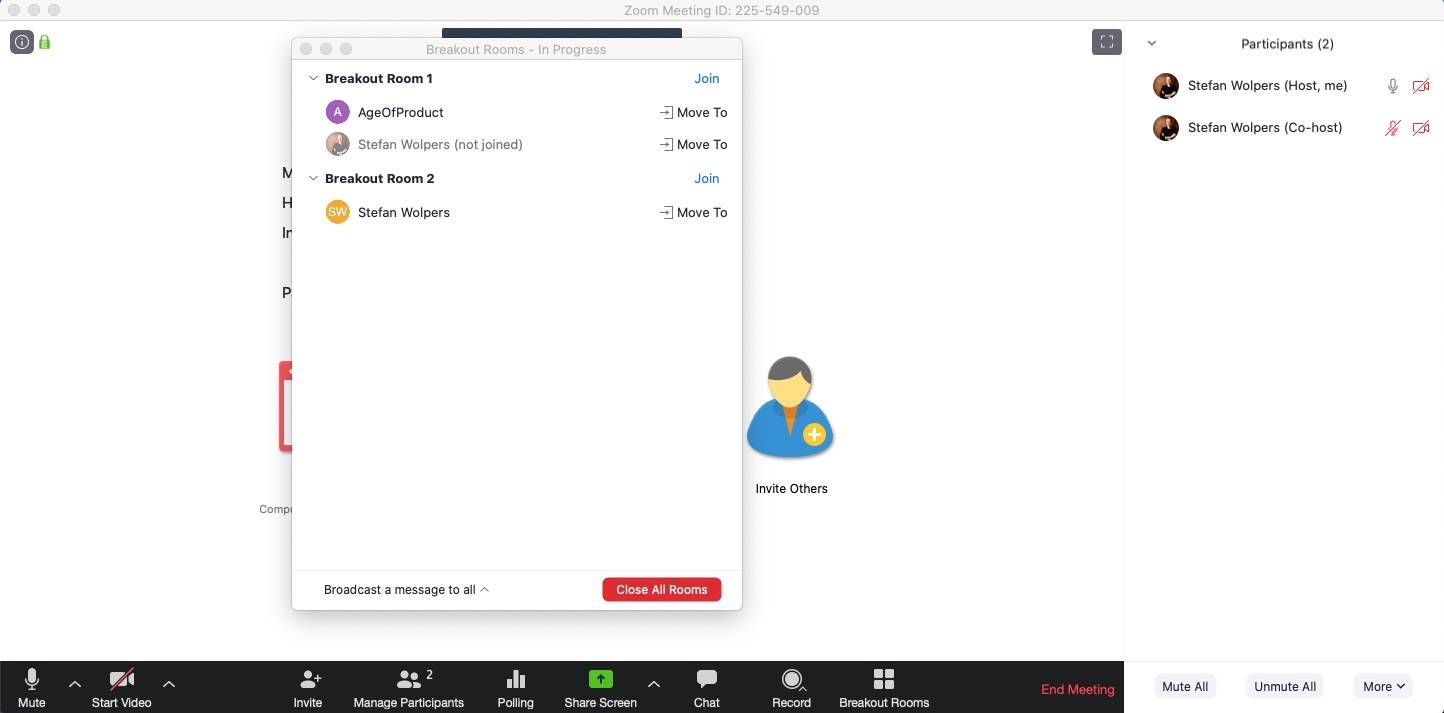
Zoom creates breakout rooms automatically by distributing all participants equally across the number of chosen breakout rooms, or the host creates them manually.
You can reassign members from one room to another room by drag-and-drop or choosing from the pick-list. This comes handy, for example, if you run an Impromptu Networking with many participants and some people end up with no partner because those failed to enter the respective breakout room. In this case, reassign participants by hand to another half-populated room to form new pairs.
You can exchange participants between breakout rooms.
You can delete suggested breakout rooms before creating them. (However, this won’t reassign participants in these rooms to other rooms automatically.)
If you restart a breakout session, you can decide to preserve the previous room composition or start over with new groups. In the case of Impromptu Networking, you want to start over with new pairs. In other cases, during virtual classes, for example, you want to preserve a group composition for several exercises to help create familiarity and trust among the member of the breakout room group.
As the host, you can terminate all breakout sessions simultaneously, thus reassigning all participants back to the main session.
Where there is light, there is a shadow, too. Of course, Zoom’s breakout rooms principally support many of the practices that Scrum Masters, agile coaches, or Product Owner need if facilitating remote agile events. However, there is quite some room for improvement:
There is no audio or chat broadcast across all breakout rooms; all you can do is send every room a text message in the form of the pop-up window.
As a facilitator, you cannot listen to discussions in breakout rooms. All you can do is enter a breakout room and participate regularly.
Zoom cannot create breakout rooms of different sizes automatically. If you need groups of different sizes you start with rooms of equal size, followed by manually assigning members from one breakout room to another.
There is no way to “resend” the original room assignment. If a participant ignores the notification or discards it, you need to manually reassign that person to a different room first and then move that user back to the room he or she is supposed to enter. This way, the invitation is reproduced.
There is no merger function of breakout rooms. For example, if you want to run a 1-2-4-All via breakout rooms, you cannot automatically merge two pairs into a quartet. Again, you need to reassign one pair to another breakout room manually.
Once triggered, you cannot abort the termination process for all breakout sessions. The only remedy here is to start another breakout session in the same room configuration as before.
As usual, there are some bugs, too. For example, as a host, I recently exited a breakout room to return to the main room, when I noticed that the breakout session administration panel was gone, while six sessions were happily proceeding. There was no way to regain access to the panel, so I had to end the Zoom meeting for all and restart it. (We lost about ten minutes that way.) Generally, the Zoom breakout room feature is quite stable.
Conclusions
Despite all of its shortcomings, Zoom is—because of the breakout rooms—currently the best tool around to facilitate Liberating Structures in distributed teams, including everyone in the process and giving each of them a voice. Given the considerable increase in agile practitioners joining Zoom at the moment, I am optimistic that we will see Zoom’s breakout room feature improve further during the coming moments.
What experience have you made with mastering Zoom? Please share it with us in the comments.
Remote Agile: Practices and Tools [Replay of a Live Virtual Class]
At the end of March, we ran a Remote Agile Practices & Tools live virtual class with about 30 participants from all over Europe, the Eastern Seaboard, and Canada. The participants agreed on recording it and make it available to the agile community. We edited the recording slightly; for example, we removed the waiting time during the exercise timeboxes. Otherwise, the video accurately reflects how one way of collaborating with a distributed team using Zoom breakout rooms may work.
Except for three teaching blocks of about 20 minutes in total, the whole Remote Agile Practices & Tools class of 2:45 hours comprised of interactive work:
If you have any questions regarding the class, please let me know via the comments, or contact me in the Hands-on Agile Slack community.
✋ Do Not Miss Out: Join the 7,500-plus Strong ‘Hands-on Agile’ Slack Team
I invite you to join the “Hands-on Agile” Slack team and enjoy the benefits of a fast-growing, vibrant community of agile practitioners from around the world.
You can book your seat for the training directly by following the corresponding links to the ticket shop. If the procurement process of your organization requires a different purchasing process, please contact Berlin Product People GmbH directly.
Share your love
Stefan Wolpers
Stefan ist Professional Scrum Trainer (PST) bei Scrum.org und arbeitet seit über 17 Jahren als Scrum Master, Agile Coach und Product Owner.
Stefan kuratiert den größten Newsletter der agilen Community — Food for Agile Thought — mit über 47.000 Abonnenten und ist der Admin der Hands-on Agile Slack-Community mit über 12.000 Mitgliedern.