TL;DR: The A3 Handoff Canvas
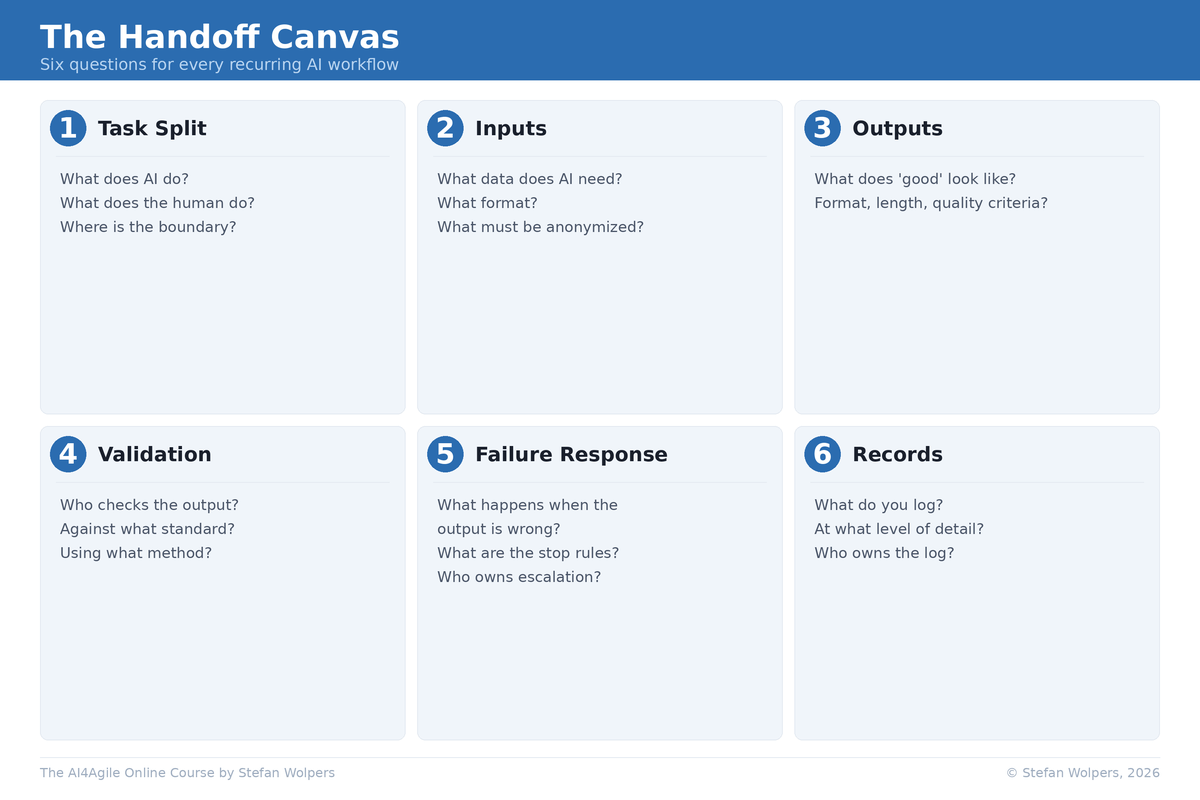
The A3 Framework helps you decide whether AI should touch a task (Assist, Automate, Avoid). The A3 Handoff Canvas covers what teams often skip: how to run the handoff without losing quality or accountability. It is a six-part workflow contract for recurring AI use: task splitting, inputs, outputs, validation, failure response, and record-keeping. If you cannot write one part down, that is where errors and excuses will enter.
The Handoff Canvas closes a gap in a useful pattern: from an unstructured prompt to applying the A3 framework to document decisions with the A3 Handoff Canvas, to creating transferable Skills, potentially leading to building agents.
The AI 4 Agile Online Course v2 at $149 — March 2, 2026
I developed the self-paced AI 4 Agile Online Course for agile practitioners, including Product Owners, Product Managers, Scrum Masters, Agile Coaches, and delivery professionals who want to integrate artificial intelligence into their workflows with clarity, ethics, and purpose.
You don’t need to become an AI expert. However, you do need to understand how LLMs like ChatGPT, Claude, or Gemini can support real agile work and where their limitations lie. As Jim Highsmith said, AI isn’t just a tool, but a new context for agility. This course shows you how to do that precisely .
The latest Version 2 will be released on March 2 and comes with an introductory price of $149 instead of $249—don’t miss this opportunity to save $100!
Don’t like to wait until March 2? Go shopping Version 1 now at $199. (The upgrade to version 2 is included.)
Join 400-plus Peers — What Is Included:
- 10+ hours of self-paced video modules: Hacks, Skills, Agents
- A cohort-hardened, proven course design
- Learn to 10x your effectiveness with AI; your stakeholders will be grateful
- Delve into classic agile use cases of AI
- Help your team create more customer value
- All texts, slides, prompts, graphics; you name it
- Access custom GPTs, including the “Scrum Anti-Patterns Guide GTP”
- Enjoy community access for peer learning
- Guaranteed: Lifetime access to all course updates and materials; there is a lot more to come
- The AI4Agile Foundation Certificate.

Please note: The course will only be available for sign-up at $149 until March 9, 2026! ????
Join the Waitlist of the AI 4 Agile Online Course v2 Now: Master AI Integration for Agile Practitioners—No AI Expertise Required!
Shall I notify you about articles like this one? Awesome! You can sign up here for the ‘Food for Agile Thought’ newsletter and join 35,000-plus subscribers.
You Solved the Delegation Question. However, Things Are Now Starting to Go Wrong.
The A3 Framework gives you a decision system: Assist, Automate, or Avoid. Practitioners who adopted it stopped prompting first and thinking second.
Good; that was the point.
But a pattern keeps repeating. A Scrum Master decides that drafting a Sprint Review recap for stakeholders who could not attend falls into the Assist category. So they prompt Claude, get a draft, edit it, and send it out. It works. By the third Sprint, a colleague asks: “How did you produce that? I want to do the same.” And the Scrum Master cannot explain their own process in a way that someone else could repeat.
The prompt is somewhere in a chat window. The context was in their head. The validation was: “Does this look right to me?”
That is not a workflow, but a habit. Habits do not transfer to colleagues and do not survive personnel changes. (Spoiler alert: you will learn how to move from prompt to create “transferable or shareable habits” with the AI4Agile Online Course.)
The Shape of the Solution
Look at the canvas as a whole before we walk through each element. Six parts, each forcing one decision you cannot skip:
- Task split: What does AI do? What does the human do? Where is the boundary?
- Inputs: What data does AI need? What format? What must be anonymized?
- Outputs: What does “good” look like? What are the format, length, and quality criteria?
- Validation: Who checks the output? Against what standard? Using what method?
- Failure response: What happens when the output is wrong? What are the stop rules?
- Records: What do you log? At what level of detail? Who owns the log?
As a responsible agile practitioner, your task is simple: complete one canvas per significant AI workflow, not per prompt, but per recurring workflow.
When not to use the canvas: One-off prompts, low-stakes personal productivity tasks, and situations where the cost of record keeping exceeds the risk. The canvas is for recurring workflows where errors propagate or where other people depend on the output.
Anti-pattern to watch for: Filling out canvases after the fact to justify what you already did. That is governance theater. If the A3 Handoff Canvas does not change how you work, you are performing compliance, not practicing it.
The data confirms this is not an edge case. In our AI4Agile Practitioners Report (n = 289), 83% of respondents use AI tools, but 55.4% spend 10% or less of their work time with AI, and 85% have received no formal training on AI usage in agile contexts [2]. Adoption is broad but shallow. Most practitioners are experimenting without structure, and the gap between “I use AI” and “I have a repeatable workflow” is where quality and accountability disappear.
Dell’Acqua et al. (2025) found a similar pattern in a controlled setting: individuals working with AI matched two-person team performance, but with inexperienced prompting and unoptimized tools, the researchers called their results a lower bound [1].
Cannot see the form? Please click here.
How to Use the A3 Handoff Canvas
Let us walk through all six fields of the canvas:
1. Task Split: Who Does What?
If you do not write the boundary down, the human side quietly becomes the “copy editor.”
Purpose: Make both sides explicit: what AI does, what the human does, who owns the result.
What to decide:
- What specific task does AI perform? (Not “helps with” but a concrete, verifiable action.)
- What specific task does the human perform? (Not “reviews” but what you review, against what.)
- Who owns the final output if a stakeholder questions it?
Example: “AI drafts a Sprint Review recap from the Jira export, structured by Sprint Goal alignment. In collaboration with the Product Owner, the Scrum Master selects which items to include, adds qualitative assessment, and decides what to share externally versus keep team-internal.”
Common failure (rubber-stamping Assist): Practitioners define the AI’s task but leave the human’s task vague. “I review it” is not a task definition. When the human side is vague, Assist degrades into copy-paste: you classified it as Assist, but you are treating it as Automate without the audit cadence, eroding your critical thinking over time. Every time you skip the judgment step, the muscle weakens. The practitioners in our AI4Agile 2026 survey who worry about AI are not worried about replacement; they are worried about losing the skills that make their judgment worth having [2].
2. Inputs: What Goes In?
Most practitioners skip this element because they think the input is obvious. It is not. Inputs drift over time, and occasionally change overnight when tooling updates.
Purpose: Specify what data AI needs, in what format, and what must stay out.
What to decide:
- Which data sources? (Jira export, meeting notes, Slack thread summaries, customer interview transcripts.)
- What format? (CSV, pasted text, uploaded document, structured prompt template, or RAG.)
- What must be anonymized or excluded before it enters any AI tool?
Example: “Input is a CSV export from Jira filtered to the current Sprint, plus the Sprint Goal text from the Sprint Planning notes. Customer names are replaced with segment identifiers before upload.”
Common failure (set-and-forget Automate): Teams define inputs once and never revisit them. If your Input specification is six months old and your tooling changed twice, you have an Automate workflow running on stale assumptions. Automate only works if you set rules and audit results. Otherwise, you get invisible drift.
3. Outputs: What Does “Good” Look Like?
The following five checks are the default quality bar inside the Outputs element of every canvas. Adapt them to your context to escape the most common lie in AI-assisted work: “I will know a good output when I see one:”
- Accuracy: Factual claims trace to a source. Numbers match the input data.
- Completeness: Includes all mandatory items defined in your Output element.
- Audience fit: Written for the specified audience (non-technical stakeholders, team internal, leadership).
- Tone: Neutral, no blame, no spin attempt, no marketing language where analysis was requested.
- Risk handling: Uncertain items are flagged, not buried. Gaps are visible, not papered over.
Purpose: Define the format, structure, and quality criteria before you prompt, not after you see the result.
What to decide:
- What format and length? (300 words, structured by Sprint Goal, three sections.)
- What must be included? (Items completed, items not completed with reasons, risks surfaced.)
- What quality standard applies? (Use the five criteria above as a starting point.)
Example: “250-to-350 words structured as: (A) Sprint Goal progress with items completed, (B) items not completed with reasons, (C) risks surfaced during the Sprint. Written for non-technical stakeholders.”
Common failure (standards drift): Practitioners define output expectations after they see the output. They adjust their standard to match what AI produced. You would never accept a Definition of Done that said “we will know it when we see it.” Do not accept that from your AI workflows either.
4. Validation: Who Checks, and Against What?
This is the element that exposes whether your Assist classification was honest or aspirational.
Purpose: Specify how the human verifies the output, separating automated checks from judgment calls.
What to decide:
- What can be checked mechanically? (Formatting compliance, length, required sections present.)
- What requires human judgment? (Accuracy of claims, appropriateness for the audience, context AI does not have.)
- What is the validation standard? (Spot-check a sample? Verify every claim? Cross-reference against source data?)
Example: “Spot-check the greater of 3 items or 20% of items (capped at 8) against the Jira export. Verify the ‘not completed’ list is complete. Read the stakeholder framing out loud: would you say this in the meeting? If two or more spot checks fail, mark the output red and switch to the manual fallback.”
Not every output is pass/fail. Use confidence levels to handle the gray zone:
- Green: Validation checks pass. Safe to publish externally.
- Yellow: Internal use only. If a yellow-status output reaches a stakeholder, that is a Failure Response event. Yellow means “human rewrite required,” not “AI-ish is close enough.”
- Red: Stop rule triggers. Switch to manual fallback.
Common failure (rationalizing Avoid as Assist): When validation is difficult, the instinct is to ban AI from the task entirely. That is too binary. Weak validation is a design constraint, not a reason to avoid. Constrain the task so validation becomes feasible: require AI to produce a theme map with transcript IDs, enforce coverage across segments, spot-check quotes against originals. Reserve Avoid for trust-heavy, relationship-heavy, high social-consequence work: performance feedback, conflict mediation, sensitive stakeholder conversations.
5. Failure Response: What Happens When It Is Wrong?
Nobody plans for failure until 10 minutes before distribution, and then everyone wishes they had.
Purpose: Define the fallback before you need it.
What to decide:
- What is the stop rule? (When do you discard the AI output and go manual?)
- How far can an error propagate? (Does this output feed into another decision?)
- Who owns escalation if the error is systemic?
Example: “If the recap misrepresents Sprint Goal progress, regenerate with corrected input. If inconsistencies are found less than 10 minutes before distribution, switch to the manual fallback: the Scrum Master delivers a verbal summary from the Sprint Backlog directly.”
Common failure (set-and-forget Automate): Teams build AI workflows without a manual fallback. When the workflow breaks, nobody remembers how to do the task without AI. Every deployment playbook includes a rollback plan. Your AI workflows need the same.
6. Records: What Do You Log?
“We do not have time for that” is the number one objection. It is also how teams end up unable to explain their own workflows three months later.
Purpose: Make the workflow traceable, learnable, and transferable.
What to decide:
- What do you store? (Prompt, Skill, input data, AI output, human edits, final version, who approved.)
- Where do you store it? (Team wiki, shared folder, project management tool.)
- Who owns the log?
Example: “Store the prompt text, the Jira export version, and the final stakeholder message in the team’s Sprint Review folder. The Scrum Master owns the log.”
Common failure (no traceability at all): The objection sounds reasonable until a stakeholder asks “where did this number come from?” and nobody can reconstruct the answer. You do not need to log everything at the same level. Use a traceability ladder:
- Level 1 (Personal): Prompt or Skill plus final output plus 3-bullet checklist you used to validate. Usually, about 2 minutes once you have the habit.
- Level 2 (Team): Add input source, versioning, and who approved. Usually about 5 minutes.
- Level 3 (Regulated): Add redaction log, evidence links, and audit cadence. Required for compliance-sensitive workflows.
Start at Level 1. Move up when the stakes justify it.
The Sprint Review Canvas: End to End
Applied to the Scrum Master’s Sprint Review recap:
- Task split: AI drafts; Scrum Master finalizes; Product Owner sanity-checks stakeholder framing.
- Inputs: Jira export (current Sprint) + Sprint Goal + Sprint Backlog deltas and impediments.
- Outputs: 250-to-350 words; sections: Goal progress / Not completed / Risks.
- Validation: Spot-check max(3, 20% of items); check for missing risks; read framing aloud.
- Failure response: Inconsistencies found: regenerate. Less than 10 min to deadline: manual verbal summary.
- Records: Prompt/Skill + Jira export version + final message stored in Sprint Review folder.
Why the A3 Handoff Canvas Matters Beyond Your Own Practice
In the AI4Agile Practitioner Report 2026, 54.3% of respondents named integration uncertainty as their biggest challenge in adopting AI [2]. It is not resistance, not tool quality, but the certainty about how AI fits into existing workflows. The A3 Handoff Canvas addresses that uncertainty at the team level: it turns “we are experimenting with AI” into “we have a defined workflow for AI-assisted Sprint Review recaps, and anyone on the team can run it.”
A filled-out A3 Handoff Canvas becomes an organizational asset. When a Scrum Master leaves, the canvases will document how AI integrates into workflows. When new team members join, they see the boundaries between human judgment and AI on day #1. When leadership asks “How is the team using AI?”, canvases provide a credible answer.
The levels interact, though. A team with an excellent A3 Handoff Canvas but no organizational data classification policy will hit a ceiling on Inputs. An organization with a comprehensive AI policy but no team-level canvases will have governance on paper and chaos in practice. Also, 14.2% of practitioners report receiving no organizational AI support at all [2]. If that describes your situation, the A3 Handoff Canvas is not optional. It is your minimum viable governance until your organization catches up.
Conclusion: Try the A3 Handoff Canvas on One Workflow This Week
Pick one AI workflow you repeat every Sprint. Write down the six elements. Fill them out honestly. Then ask your team: Does this match how we work, or have we been running on implicit assumptions?
If you get stuck on Validation or Failure Response, you found the weak point before it found you.
References
[1] Dell’Acqua, F., Ayoubi, C., Lifshitz, H., Sadun, R., Mollick, E., Mollick, L., Han, Y., Goldman, J., Nair, H., Taub, S., and Lakhani, K.R. (2025). “The Cybernetic Teammate: A Field Experiment on Generative AI Reshaping Teamwork and Expertise.” Harvard Business School Working Paper 25-043.
[2] Wolpers, S., and Bergmann, A. (2026). “AI for Agile Practitioners Report.” Berlin Product People GmbH.
The A3 Framework article, which covers the delegation decision that precedes the canvas, is available here: The A3 Framework: Assist, Automate, Avoid.
Put the A3 Handoff Canvas into Practice
If the A3 Framework and the A3 Handoff Canvas sound useful to you, consider joining the AI4Agile online course. The course covers prompt engineering for Agile practitioners, AI-assisted Refinement, Retrospectives, product discovery, automation workflows, and the ethics of AI in Agile work. Version 2 launches on March 2, 2026.
A3 Handoff Canvas — Related Posts
The AI4Agile Practitioners Report 2026
Ralph Wiggum Ships Code While You Sleep. Agile Asks: Should It?
Assist, Automate, Avoid: How Agile Practitioners Stay Irreplaceable with the A3 Framework
Agile Is Dead, Long Live Agility
The Reformation That Became the Church
The Immunity Response: How Organizations Neutralize Change
The Immunity Response: How Organizations Neutralize Change
AI Transformation Déjà Vu: Why Today’s Failures Look Uncannily Like Yesterday’s “Agile Transformations”
Stefan Wolpers: The Scrum Anti-Patterns Guide (Amazon advertisement.)
Scrum Training Classes, Workshops, and Events
Learn more about the Agile AI Manifesto with our AI and Scrum training classes, workshops, and events. You can secure your seat directly by following the corresponding link in the table below:
See all upcoming classes here.

You can book your seat for the training directly by following the corresponding links to the ticket shop. If your organization’s procurement process requires a different purchasing approach, please contact Berlin Product People GmbH directly.
✋ Do Not Miss Out and Learn More about the A3 Handoff Canvas — Join the 20,000-plus Strong ‘Hands-on Agile’ Slack Community
I invite you to join the “Hands-on Agile” Slack Community and enjoy the benefits of a fast-growing, vibrant community of agile practitioners from around the world.

If you would like to join all you have to do now is provide your credentials via this Google form, and I will sign you up. By the way, it’s free.